
PortareOS
For Retroid Pocket Nova owners who care about every frame and millisecond.
Home · Features · Installation guide · Documentation · Known issues · Roadmap
Black coffee without sugar and milk. With the right amount of beans and water.
PortareOS tunes the whole stack for low latency, consistent frame delivery and faithful console timing on the Nova's 1280×960 panel, at variable refresh up to 120 Hz. Hardware follows the console's refresh and audio rates wherever possible. Correctness comes first, then latency; features that serve neither come out.
Write the card, copy your games across, and play. One emulator per system, with configs, scaling and shaders tuned for this device; tweaking is not expected. Nova only, NTSC focused. Other device trees have been deleted. PAL is not planned, though fixes that preserve NTSC behaviour are welcome. 16:9 systems, except PSP, are not supported.
Installation and use · Systems and status · Screenshots · Technical details · Building
Installation and everyday use
Follow the installation guide. The first image requires a fresh card installation: PortareOS's own boot partition label prevents in-place updates from ROCKNIX. Later updates download from GitHub over Wi-Fi through the launcher, using the nightly or release channel, and install on restart.
Use CHD for disc games; cartridge games keep their native ROM formats. PlayStation, PS2, Dreamcast and Neo Geo CD enforce CHD-only images. Use PortareOS tools / nova-push to convert and verify CUE, GDI or ISO images while transferring them over SSH. It also copies existing CHDs and cartridge ROMs. See the installation guide for setup, multi-disc playlists and experimental systems with other format requirements.
portarelauncher provides consoles, games and settings for Wi-Fi, Bluetooth, SSH, USB mode, language and time zone, and updates, in English or Japanese. Each device generates a root password on first boot, shown under About.
- Home + Start quits every emulator; M1 + volume adjusts brightness anywhere.
- M2 in RetroArch opens a game guide: place a text file beside the ROM
with its name and
.txt. The game pauses; M2 or B returns to it. - L1 + Y shows or hides the MangoHud performance overlay in a game. The
overlay is off by default;
portareos.mangohud.enabled=1insystem.cfgloads it, orpsx.portareos.mangohud.enabled=1for one system. - Settings > Consoles > PRMPT toggles one preemptive frame on supported consoles. Neo Geo CD enables it by default; the others keep it off. PlayStation offers it with additional CPU/GPU cost; see the emulator notes.
Systems and status
Early development: things may break. Compatibility and performance vary by game. Status notes below cover specific tests, not every included system.
| System | Emulator / player | Status notes |
|---|---|---|
| Arcade, Neo Geo | FBNeo | — |
| Neo Geo CD | NeoCD | ✅ Tested and tuned: full-screen 4:3, scanlines, one preemptive frame; optimization finished (#666) |
| Game Boy, Game Boy Color | Gambatte | — |
| Game Boy Advance | mGBA | — |
| NES, Famicom, Famicom Disk System | MesenCE | — |
| Super Nintendo | Snes9x | ✅ Tested; bsnes was too costly |
| Nintendo 64 | ParaLLEl N64 with ParaLLEl-RDP on Vulkan | — |
| GameCube, Wii | Dolphin (libretro) | ❌ GameCube: hangs, no sound (#463) |
| Master System, Game Gear, Mega Drive, Sega CD | Genesis Plus GX | 🚧 Mega Drive baseline measured on Thunder Force IV; savestates made deterministic; scanlines undecided (#691) |
| 32X | PicoDrive | — |
| Dreamcast, NAOMI, Atomiswave | Flycast | — |
| PlayStation | SwanStation | ✅ Tested |
| Saturn | Ymir | — |
| PlayStation 2 | ARMSX2 (libretro) | 🚧 Playable; optimization ongoing (#477) |
| PSP | PPSSPP | — |
| Xbox | xemu | — |
| Point-and-click | ScummVM | — |
| PC (x86 through FEX) | Steam on gamescope | ✅ Tested 2026-10-05; details below |
| Movies, music | mpv, PORTAMP | — |
Steam launches from the launcher again (#533); SUPERHOT runs with sound (#535, #536), and Big Picture uses a readable 1.6 scale (#534).
See folders, formats and cores for game setup, emulator notes for measurements and configuration decisions, and removed packages for alternatives dropped along with their untuned settings.
Known issues tracks observed problems and changes awaiting device testing. The roadmap covers emulator reliability, measured latency, suspend validation and further footprint reductions.
What it looks like
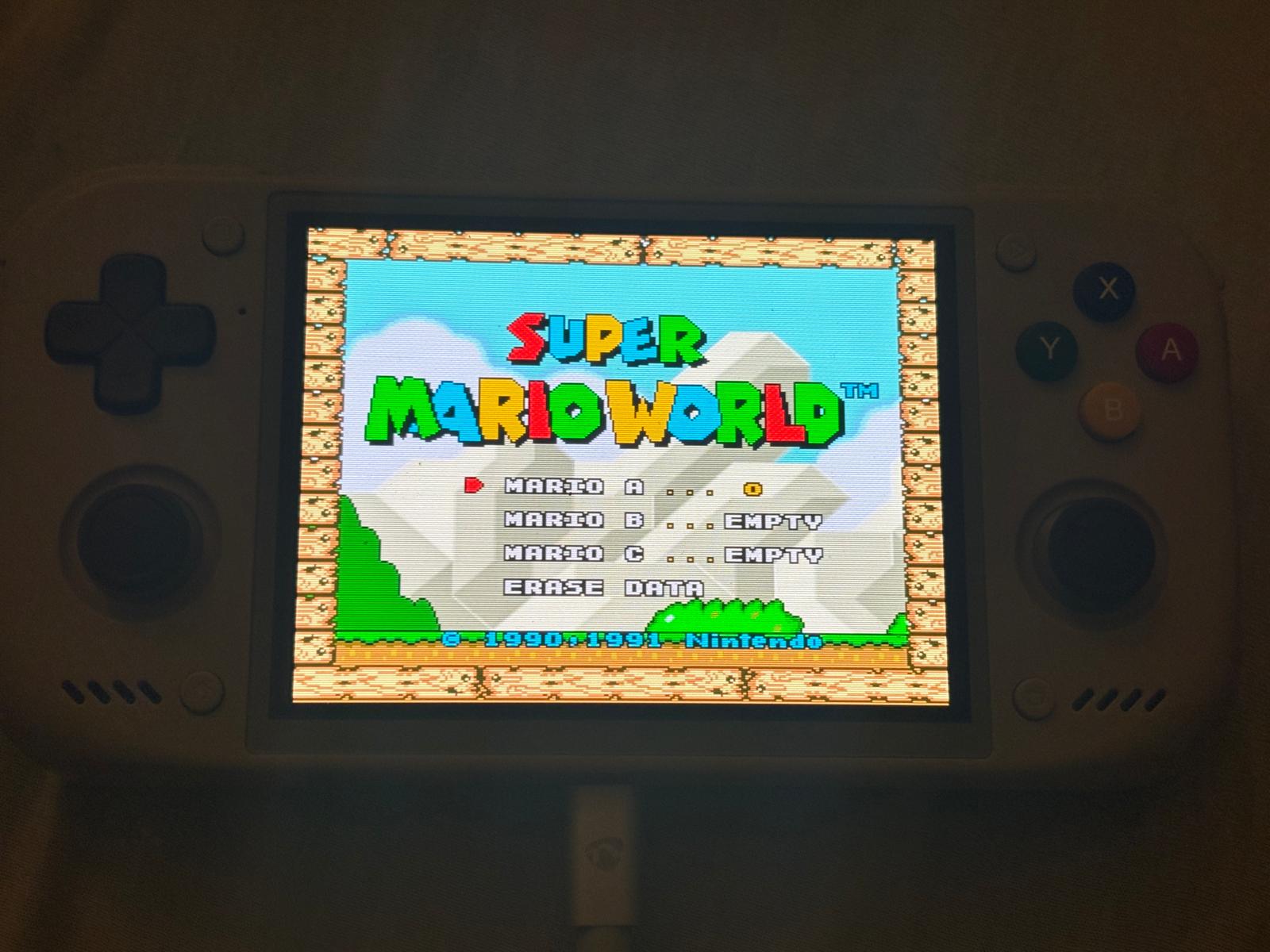
Super Mario World. SNES timing at 120.198 Hz, exact 4× CRT scanlines with 32-pixel bars, and a 32 kHz audio link.
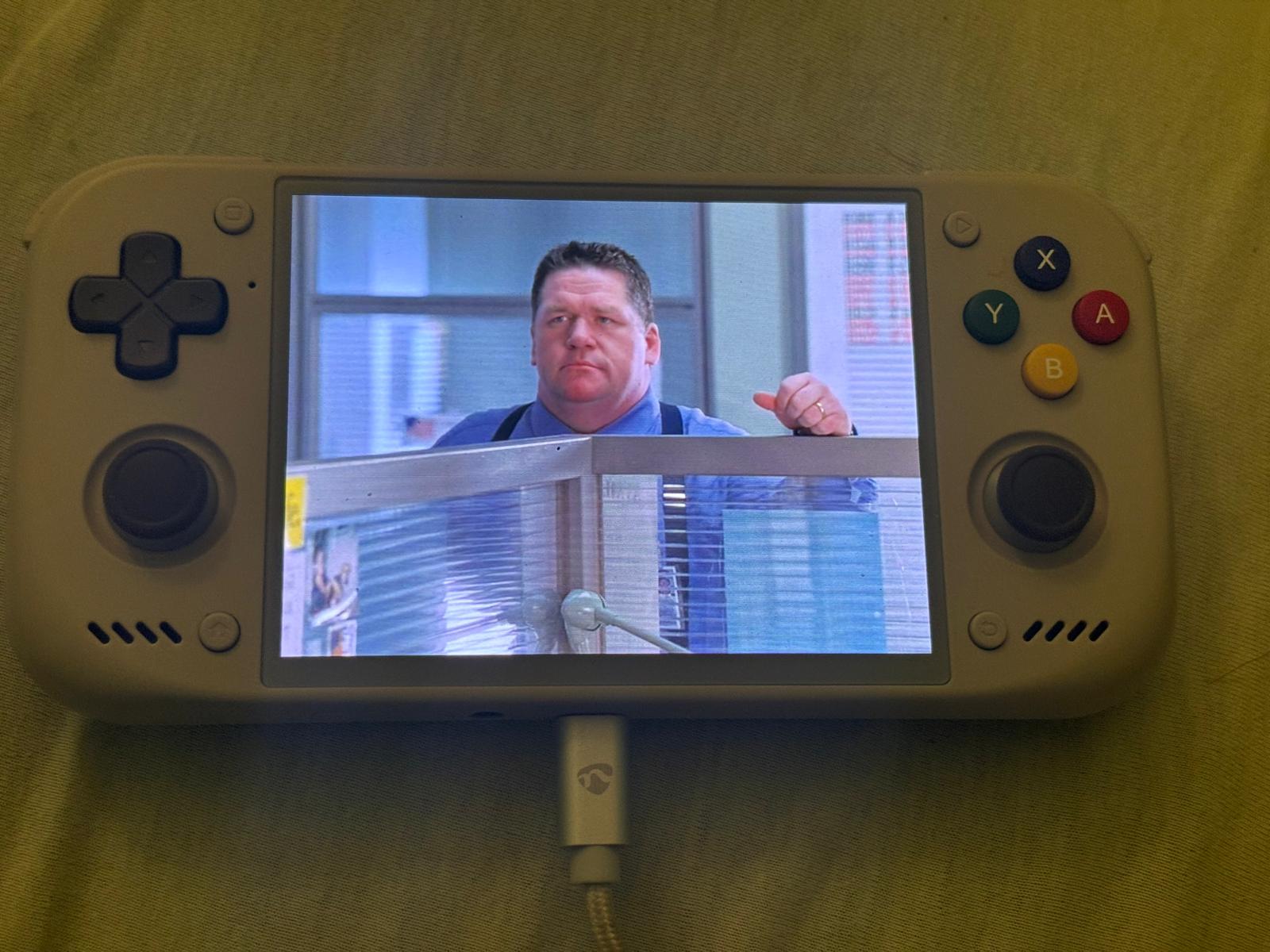
A DVD rip. Hardware H.264/HEVC decoding, direct Vulkan output, restored 4:3 aspect for SD rips missing aspect flags, and scanlines. Playback position is saved on quit.
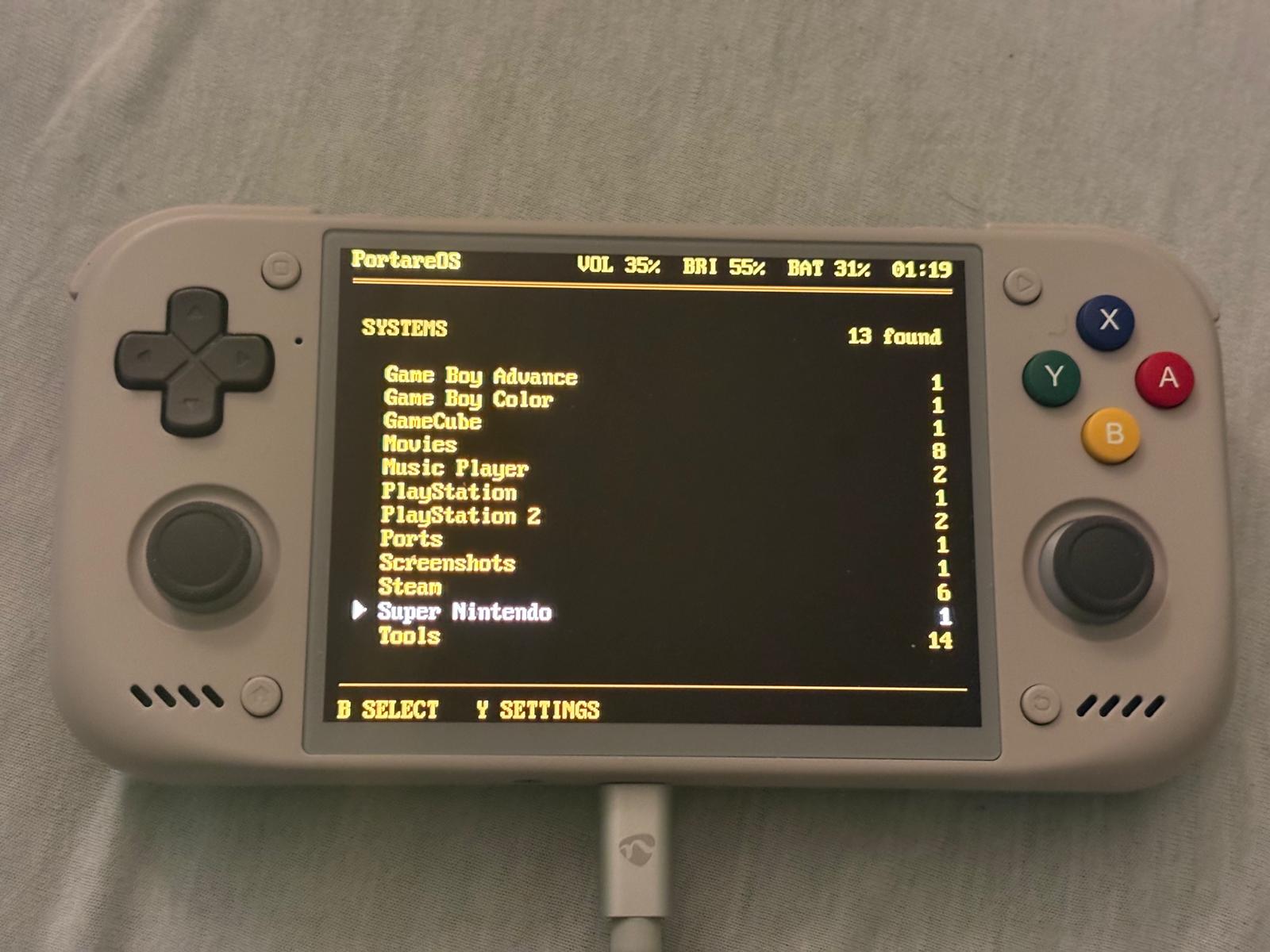
The launcher. Text on black: systems with games, game counts, volume, brightness, battery and time.
Design and performance
Kernel, emulators, DSP topology, display driver, input path and frontend are all open to change. Measurements guide the work.
Integer-multiple variable refresh at the console's rate
RetroArch enables variable refresh automatically on the built-in panel when it is the only connected display and no display mode is pinned. The panel follows timed frames within a 65–120.198 Hz range, using the display controller's AVR, the hardware behind Qualcomm's Qsync.
RetroArch paces the game at the core's reported frame rate, and our Mesa Vulkan WSI patches time its presentation. The kernel's display driver handles integer-multiple scanout: it repeats each frame at evenly spaced intervals to keep the panel within its refresh range, without rendering or submitting the frame again. For the usual NTSC rates, that means two scans: 2 × 59.8261 Hz for the PlayStation, 2 × 60.0988 Hz for the SNES. Lower rates use more repeats, such as four scans at 30 fps. All systems use the fastest panel mode as the base for variable refresh.
RetroArch always keeps vsync off and Sync to Exact Content Framerate on, including at fixed refresh. Rates too high to fit twice, such as arcade boards near 61 Hz, are refused on the variable-refresh path: “This game is not supported” appears, then RetroArch returns to the launcher.
In 10-minute runs on 9 October 2026 with kernel repeats, Super Mario World showed 35,963 of 35,967 frames twice, and Tekken 3 showed 35,781 of 35,793 twice. Late frames and startup can still disrupt the cadence. See variable refresh for the hardware, measurements and design.
The launcher and Steam's gamescope also use variable refresh; Steam is
capped at 60 fps. A real game on the final gamescope/kernel combination
still needs validation. Fixed refresh remains for xemu and mpv, and for
RetroArch when variable refresh is disabled. To compare, set global.vrr=0 in
/storage/.config/system/configs/system.cfg; use snes.vrr=0 for one
system or snes["Super Mario World.sfc"].vrr=0 for one ROM filename.
With fixed refresh, RetroArch selects a mode from the table below and
still times frames at the core's rate; each is shown at the next refresh.
| Panel mode | Console | Frame rate |
|---|---|---|
| 119.880 Hz | Dreamcast, PS2, PSP, GameCube, Xbox; default mode | 59.94 |
| 119.653 Hz | PlayStation, Nintendo 64, Saturn | 59.8261 |
| 119.455 Hz | Game Boy, Game Boy Color, Game Boy Advance | 59.7275 |
| 120.198 Hz | Super Nintendo, NES | 60.0988 |
| 119.846 Hz | Master System, Game Gear, Mega Drive, Mega CD | 59.9227 |
| 118.360 Hz | Neo Geo | 59.18 |
| 119.200 Hz | Neo Geo CD | 59.5999 |
| 120.000 Hz | Fixed 120 Hz mode; Steam now uses 120.198 Hz with VRR and a 60 fps cap | 60 |
Every mode now uses the panel's own 1302 × 998 timing, changing only the pixel clock. The wider blanking used previously let the panel lose lock and tear under variable refresh. Modes are within 3.2 parts per million of their target rates, except the fastest, SNES/NES, which is rounded slightly up (+4.4 ppm) so doubled SNES frames fit. SwanStation does not yet follow real PlayStation mid-game rate changes. See refresh rates for implementation and measurements.
Black frame insertion has been removed, along with the vsync settings it depended on. Previously saved values are cleared automatically.
Audio stack
Audio flows from the application through PipeWire to the selected output. The solid arrows carry audio; the dotted arrow shows WirePlumber's routing and device policy.
flowchart TD
    RA["Libretro core → RetroArch"] -->|Native PipeWire| PW
    MPV["mpv / PORTAMP"] -->|Native PipeWire| PW
    APPS["Other audio clients"] --> COMPAT["PulseAudio / ALSA compatibility"]
    COMPAT --> PW["PipeWire mixer and graph<br/>32 / 44.1 / 48 kHz; 3 ms minimum quantum"]
    WP["WirePlumber<br/>Device selection and routing"] -.-> PW
    PW --> ALSA["ALSA / ASoC kernel drivers"]
    ALSA -->|Shared-memory pull mode| DSP["Qualcomm AudioReach DSP"]
    DSP -->|MI2S| AMP["Two aw88166 amplifiers"]
    AMP --> SPK["Built-in speakers"]
    DSP -->|Codec DMA| CODEC["WCD938x codec"]
    CODEC --> HP["Wired headphones"]
    DSP --> DP["DisplayPort audio<br/>USB-C external display"]
    PW --> BT["BlueZ / Bluetooth audio"]
    BT --> WIRELESS["Bluetooth headphones / speakers"]
The built-in speaker and headphone links follow supported stream rates. Bluetooth and external displays negotiate their own formats and buffering; the graph's quantum is not the end-to-end audio latency.
Audio at the console's sample rate
Kernel and DSP changes let the audio link follow the core's output at 48, 44.1 or 32 kHz. RetroArch selects the rate when opening the audio device.
| Link rate | Consoles |
|---|---|
| 44.1 kHz | PlayStation, Dreamcast, PSP, Neo Geo CD, every Sega system; N64 games at 22 or 44.1 kHz |
| 32 kHz | Super Nintendo; N64 games at 32 kHz |
| 48 kHz | PS2, Xbox, GameCube and Wii, and everything else |
N64 rates vary by game; the core reports the programmed rate and the device reopens at the matching link rate. Resampling is avoided where hardware supports the rate; the SNES's exact 32040 Hz is unavailable. See audio sample rates for hardware limits and emulator output rates.
Lower audio latency
AudioReach shared-memory pull mode gives the driver a sample-accurate
position. Removing SNDRV_PCM_INFO_BATCH stops PipeWire adding a period of
batch-device headroom. Qualcomm DSP periods follow the stream's rate:
10 ms instead of 480 frames, which previously meant 15 ms for SNES audio.
PortareOS configures PipeWire for a 3 ms graph quantum. Current PCM
measurements and the remaining latency budget are documented in
audio latency.
RetroArch defaults to 8 ms, down from the observed 32 ms crackle-free floor. This setting is not end-to-end latency. Camera tests showed improvement, though audio latency remains somewhat higher than Android.
Configured for this panel
- Integer scaling to fit the 960-line panel: Game Boy at 960×864, GBA at 5×, N64 at 2× on ParaLLEl-RDP, and PlayStation at 4×. Game Boy, GBC and GBA use LCD shaders; PlayStation uses our CRT shader. SNES uses crt-guest-advanced at exact 4×, keeping 32-pixel bars around 224 lines to preserve even scanlines.
- Correct palettes and boot logos, with GBC hardware and color correction for Game Boy Color.
- Optional sRGB/D65 color correction through the display controller applies to games, films and the launcher. Both profiles crush dark greys, so stock remains the default pending a refit. See color profiles.
- No automatic savestate loading.
Latency and input
A 1000 Hz kernel tick, selectable preemption, teo idle governor, schedutil with the chip's energy model, per-core swapchain sizes and no threaded video reduce buffering and jitter. With variable refresh, RetroArch disables automatic frame delay and schedules each frame using recent CPU and GPU completion times plus a safety margin. This is a presentation target; actual display latency also depends on the panel's refresh limits.
Recorded latency measurements separate the emulator and display path from the gamepad, the game's own lag and scanout. A community tester also reported button-to-screen latency about one frame lower than Android; that result describes the tested setup.
The gamepad MCU reports every 5 ms (200 Hz), down from the vendor's
9 ms (111 Hz). rsinput.frame_rate=3 sets the scan delay from boot and
restores it on resume; UART measurements confirmed 200 Hz across two
suspend/resume cycles (#466).
At 250 Hz, about 19% of reports failed to reach evdev, so 200 Hz is the
default. The effect on button-to-screen latency still needs measurement.
Video stack: KMS, no desktop
Each program controls presentation directly, without a desktop compositor's frame queue or EmulationStation:
flowchart TD
    RA["Libretro core → RetroArch<br/>Core timing, scaling and shaders<br/>Timed presents for integer-multiple VRR"] --> VK
    MPV["mpv<br/>Decode, scale and shaders<br/>Fixed refresh"] --> VK
    XEMU["xemu<br/>Vulkan renderer by default; fixed refresh"] --> SDL["SDL3 KMSDRM<br/>Vulkan display surface"]
    SDL --> VK
    VK["Mesa Turnip / Vulkan<br/>Adreno GPU rendering"] --> WSI["Mesa Vulkan WSI / VK_KHR_display<br/>PortareOS patches: timed presents<br/>and VRR control"]
    WSI -->|Timed page flips| KMS
    STEAM["Steam / PC games<br/>60 fps ceiling"] --> GS["gamescope compositor<br/>DRM backend; variable refresh"]
    GS --> KMS
    LAUNCHER["portarelauncher<br/>CPU-written dumb buffer; variable refresh"] --> KMS
    KMS["Linux DRM/KMS<br/>Patched msm driver: DSI VRR / AVR control<br/>and integer-multiple repeats"] --> DPU["Qualcomm display controller<br/>Scanout, optional color correction and AVR"]
    DPU -->|MIPI DSI| PANEL["Nova AMOLED panel<br/>1280 × 960; up to 120.198 Hz"]
The diagram follows the built-in panel. The launcher releases display ownership while a game or player runs and takes it back on exit. xemu's default Vulkan renderer uses Turnip, with SDL3 KMSDRM creating the direct display surface. Steam uses gamescope for composition.
Integer-multiple VRR spans RetroArch, Mesa and the kernel. RetroArch
submits each frame once with a presentation target. Our Mesa Vulkan WSI
patches time the page flips and enable VRR_ENABLED. The patched msm
driver schedules integer-multiple repeats through the display controller's
AVR, scanning the same buffer at evenly spaced intervals without another
render, submission or page flip, within a 65–120.198 Hz range. For example,
59.8261 fps becomes 119.6522 Hz (2×), and 30 fps can become 120 Hz (4×).
Kernel repeat scheduling applies to any commit with VRR_ENABLED set,
whether timed or not; mpv and xemu currently use fixed refresh. The launcher
and Steam's gamescope use the same kernel repeat scheduling.
See variable refresh for the Mesa and
kernel patches and measured behavior.
Small services handle the rest:
- portnet: a C client using sd-bus and iwd replaces NetworkManager. iwd handles Wi-Fi and addressing; saved networks migrate.
- portsense: device-specific C input handling replaces inputsense.
- Bluetooth agent: a C pairing and auto-connect daemon using BlueZ over sd-bus.
- PORTAMP and sdl3text: music player and in-game text guide reader.
Device integration
Suspend/resume fixes cover UFS, PCIe, audio clocks, Wi-Fi, the gamepad MCU and LEDs. The SoC now reaches platform sleep: a 10-minute test on 18 October measured 23 mA, with CX, AOSS and DDR asleep. Overnight drain and wider resume coverage still need verification; see power measurements. microSD runs at UHS-I SDR104, and the GPU can drop to 124.8 MHz for menus and films. Charging mitigation reduces current as the battery warms; device verification is pending.
Image size
The compressed image is under 500 MB, without artwork scraping, a media centre or a file manager. Duplicate tools and wrappers are removed; the package inventory records historical size measurements and remaining candidates. Re-measure the current image before quoting further savings.
Building
make docker-SM8550
Images are written to target/. The build wants a container runtime, roughly
100 GB of disk and several hours the first time through. The Build
workflow supports incremental builds. Kernel, Mesa, PipeWire and RetroArch
are kept current; a daily workflow opens pull requests for emulator updates.
Debugging and measurement
Unofficial builds include gdb, strace, vblank-rate, vrr-probe, present-probe, tear-test, pcm-flags and pcm-floor. Performance, power and CPU-placement probes complement the display and audio tests, with host scripts for recording and checking runs over SSH.
The debug tools guide explains what each tool measures, where to run it, example commands and how to read the results.
Development is 100% AI-assisted, and I plan to keep it that way.
Origin and licences
PortareOS began as a fork of ROCKNIX, itself a fork of JELOS. Much of the underlying engineering is theirs. PortareOS no longer tracks ROCKNIX: no merges or imports, and every package is maintained here. Please raise PortareOS problems here; the upstream project is at rocknix.org.
PortareOS's own work is licensed under the
GNU GPL Version 2. Everything
inherited keeps its licence and its credit; see LICENSE.md and
the licenses folder.